
Leap year program flowchart and program in Javascript JS with form values entered by user
In this tutorial, we will try to learn the followings;
- Flowchart of Leap year program.
- Leap year program.
- Leap year program with form values entered by user.
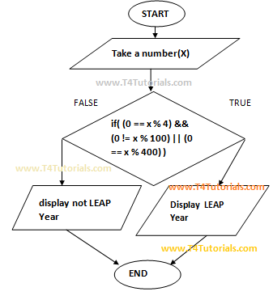
Flowchart of Leap year program.
Leap year program.
<html>
<head>
<script>
function leapyear()
{
var x;
x=2019;
if( (0 == x % 4) && (0 != x % 100) || (0 == x % 400) )
{
alert(x+" is a leap year: Congratulations");
}
else
{
alert(x+" is not a leap year: Sorry");
}
}
</script>
</head>
<body>
<h2>Javascript (JS) Program to find leap year</h2>
<h2>Given the year of 2019:</h2>
<button onclick="leapyear()">Check</button>
</body>
</html>
Leap year program with form values entered by user.
<html>
<head>
<script>
function leapyear()
{
var x;
x = document.getElementById("demo").value;
if( (0 == x % 4) && (0 != x % 100) || (0 == x % 400) )
{
alert(x+" is a leap year");
}
else
{
alert(x+" is not a leap year");
}
}
</script>
</head>
<body>
<h2>Javascript Program to find leap year</h2>
<input type="text" id="demo"></input>
<button onclick="leapyear()">Check</button>
</body>
</html>