
How to describe Use Cases?
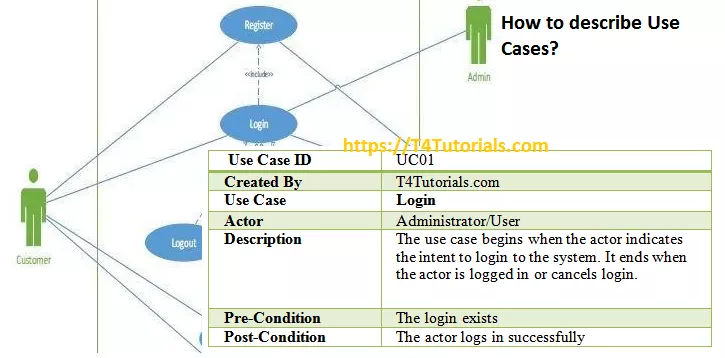
The use case description is a detailed document of all the steps that can be performed by the actor of the system or the system to complete an operation.
Some of the important parts of the use case descriptions are mentioned below;
- Title: Title represents the functional requirements of the system. For example, the title “Register Employee” is the use case and its goal is for the employee to be able to register for a class.
- Actors: Actors are the people or the systems who interact with the use cases. In other words, we can say that actors perform the functional requirements. For example, the title “Register Employee” is the functional requirement representing the use case and it can be performed by an actor.
- Preconditions: Preconditions are the requirements that must fulfill before the activity.
- Postconditions: Postconditions represents the finish of the use case successfully or unsuccessfully. Its can be further extended to the main success scenario and alternate scenario.
- Path: The path is the step-by-step action that places between the actor and the system. Paths come in three types:
- Use case ID: A unique identifier that is helpful for tracking the use case record.
- Description: A brief textual description of what the use case does.
- Created by: The author of the use case who writes the use case.
Case Study of the use case description
If you want to read the functional requirements of the given case study, then click Here. However, use case descriptions are mentioned below.
| Use Case ID | UC01 |
| Created By | T4Tutorials.com |
| Use Case | Login |
| Actor | Administrator/User |
| Description | The use case begins when the actor indicates the intent to login to the system. It ends when the actor is logged in or cancels login. |
| Pre-Condition | The login exists |
| Post-Condition | The actor logs in successfully |
| Use Case ID | UC02 |
| Created By | T4Tutorials.com |
| Actor | Administrator |
| Description | The use case begins when the actor indicates the intent to view, update, add or delete Categories record. It ends when the actor closes the Category form. |
| Pre-Condition | 1-The Categories record exists for editing/view.
2-The actor is logged in |
| Post-Condition | The Categories record is added r updated. |
| Use Case ID | UC03 |
| Created By | T4Tutorials.com |
| Use Case | Manage Customer Records |
| Actor | Administrator |
| Description | The use case begins when the actor indicates the
intent to view, update add or delete Customer’s record. It ends when the actor closes the Customer form… |
| Pre-Condition | 1-The Customer’s record exists for editing/view.
2-The actor is logged in |
| Post-Condition | The Customer’s record is added or updated. |
| Use Case ID | UC04 |
| Created By | T4Tutorials.com |
| Use Case | Manage User Records |
| Actor | Administrator |
| Description | The use case begins when the actor indicates the
intent to view, update, add or delete user’s record. It ends when the actor closes users form. |
| Pre-Condition | 1-The user’s record exists for editing/view.
2-The actor is logged in. |
| Post-Condition | The user’s record is added or updated. |
| Use Case ID | UC05 |
| Created By | T4Tutorials.com |
| Use Case | Manage Item Records |
| Actor | Administrator |
| Description | The use case begins when the actor indicates the
intent to add, update, delete or view item’s record. Categories and Manufacturers can be searched. It ends when the actor closes the form. |
| Pre-Condition | 1-The Items record exists for editing/view.
2-The actor is logged in. |
| Post-Condition | The item’s record is added or updated. |
| Use Case ID | UC06 |
| Created By | T4Tutorials.com |
| Use Case | Manage Distributor Records |
| Actor | Administrator |
| Description | The use case begins when the actor indicates the
intent to add, update, delete or edit distributor’s record. It ends when the actor closes the Distributors form. |
| Pre-Condition | 1-The distributor record exists for editing/view.
2-The actor is logged in. |
| Post-Condition | The distributor’s record is added or updated. |
| Use Case ID | UC07 |
| Created By | T4Tutorials.com |
| Use Case | Manage Manufacturer Records |
| Actor | Administrator |
| Description | The use case begins when the actor indicates the
intent to add, update, delete or edit manufacturer’s record. It ends when the actor closes the Manufacturer form. |
| Pre-Condition | 1-The Manufacturer record exists for editing/view.
2-The actor is logged in. |
| Post-Condition | The Manufacturer’s record is added or updated. |